
Match a paint color from a photo: tap any spot, or type a color code, to see what color it is: its name, its code, its LRV (how much light it reflects), its undertone and how it reads in a north- or south-facing room. Your photo never leaves your device.
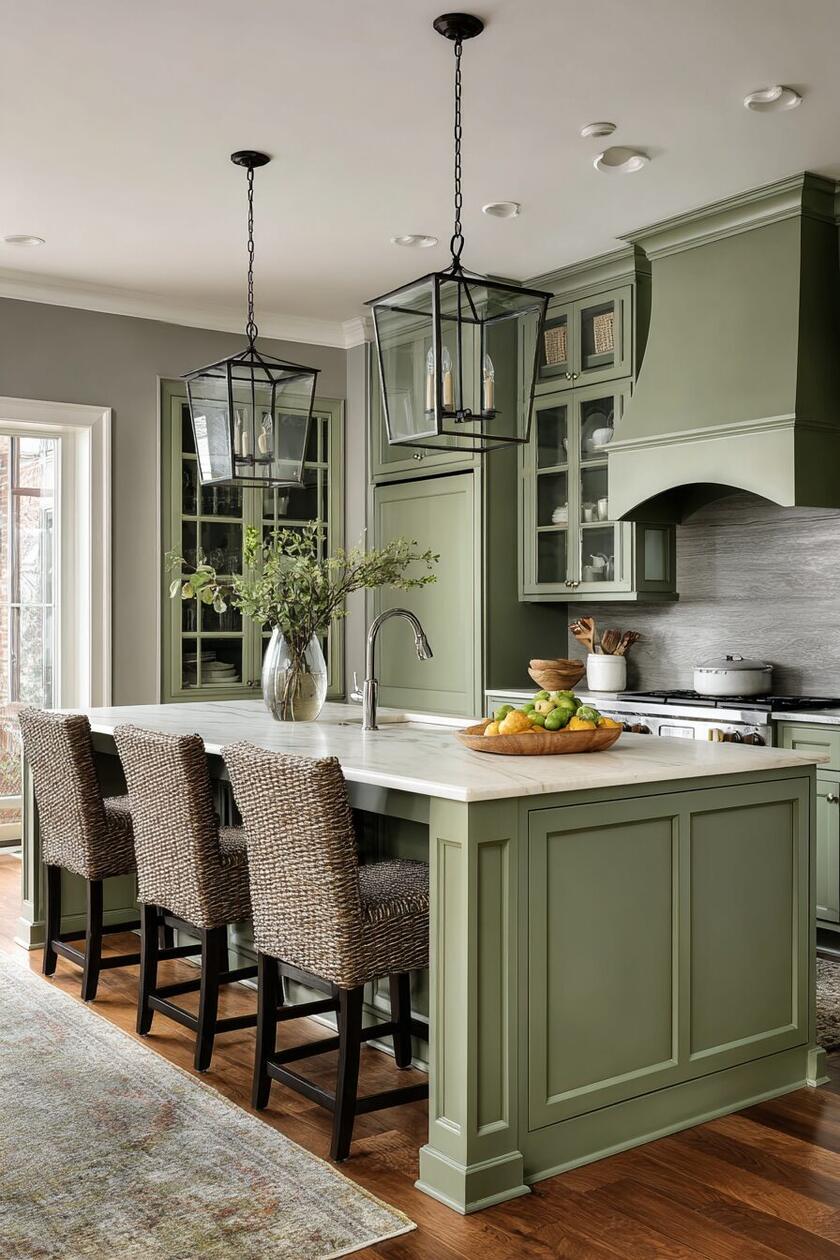
Tap any spot to name its color
Main colors in this photo
Tap a spot on the photo
Its name and color code appear here
Closest Sherwin-Williams, Benjamin Moore and Behr colors
A screen shows each brand's digital version of a paint, and light changes it again: check a real chip or a sample on your wall before you buy. Matched against each brand's own designer palette files; we are not connected to any of these brands.
Colors that go with it
Your picks
Quick answer: to match a paint color from a photo, upload the photo and tap the spot. The matcher above averages a small patch around your tap, so a glint or a speck of shadow does not decide it. It names the color (“sage green”, “greige”), gives its color code, how much light it reflects (LRV), its undertone, how it reads in a north- or south-facing room, and the closest Sherwin-Williams, Benjamin Moore and Behr colors, by code and name. Then try it on your own walls or your house. It is free and runs in your browser; the photo is never uploaded.
How to use the paint color matcher
- Add a photo of the room, the sofa, the tile or the rug whose color you love, or start with a sample room.
- Tap the spot. Pick a flat, evenly lit patch, not a highlight or a shadow. The color’s name, code and details appear at once.
- Check the photo’s main colors under the picture: the matcher pulls out the colors the photo is mostly made of. Tap one to see it.
- Read the closest brand colors. Under the result, the matcher lists the nearest Sherwin-Williams, Benjamin Moore and Behr paints, with how close each one is. Tap a runner-up to see it in turn.
- Collect a few. Every color you pick is kept under Your picks, so you can compare a shortlist. Have a code already? Type it in.
- Try it on your walls: the button opens the room paint visualizer with that color ready to paint on a photo of your room.
How the matcher reads a color
Why it averages a patch
A single pixel of a photo is noisy: a speck of light, a shadow in the grain, a compression artifact. The matcher takes a small disc around your tap, leaves out its brightest and darkest fifth, and averages the rest. That is the color the surface really has in that photo.
The name, the code and the LRV
The name comes from the color’s lightness, how colorful it is, and its hue, measured in CIELAB, the color space built to match how people see color. The hex code (like #A9B59B) is the exact color on screen. LRV, light reflectance value, is the share of light the color reflects, from 0 (black) to 100 (pure white): 55 or more keeps a room bright, 20–54 reads as a clear color, under 20 is dark and cozy.
How close is close: ΔE
The matcher measures how far one color is from another with CIEDE2000 (ΔE), the color-difference formula the paint and print industries use. It is how it finds the closest color on our swatch board.
| ΔE | What it means | The matcher says |
|---|---|---|
| Under 1 | No visible difference | identical |
| 1 to 3 | Only side by side, in good light | very close |
| 3 to 6 | A slightly different shade | close |
| Over 6 | A different color | the nearest we have |
What LRV means, and your color’s
LRV (light reflectance value) is the share of light a paint color reflects: 0 is black, 100 is a perfect white. Paint makers print it on most color cards, and the matcher works it out for every color you tap, from the color’s luminance. It is the quickest way to know whether a color will brighten a room or close it in.
LRV matters most when the light is poor. Sherwin-Williams’ guide to choosing paint by room direction says north-facing rooms receive the least amount of light throughout the day
, that With north facing rooms, you’ll want to look at colors that have a higher LRV
, and that It’s best to avoid colors with cool undertones since those cool tones will make the room appear colder
. South-facing rooms tend to experience consistent warm light throughout the day
, so there you’ll need to avoid choosing a color that’s too warm
, and neutral toned colors may seem warmer
.
Right under the result, the matcher applies that to the color you picked: its LRV, a line for a north-facing room and a line for a south-facing room. Sherwin-Williams gives no number for “higher”, so the matcher uses its own light band, LRV 55 and up.
Undertones: what a white, gray or beige leans toward
An undertone is the faint color inside a neutral: the yellow in a warm white, the green in a cool gray. The matcher reads it from the color’s hue and how much color it carries (its chroma in CIELAB), and labels it as its own color maths, not a paint maker’s description. Under a chroma of 2 there is nothing to lean; from 2 to 6 the lean is slight, from 6 to 12 clear, and above that you are looking at a color rather than an undertone.
| Color | Code | LRV | Undertone |
|---|---|---|---|
| Bright White | #F8F8F5 | 94 | none, a true neutral |
| Soft White | #F4F1EA | 88 | leans yellow, slightly |
| Cloud | #E9EAE6 | 82 | leans green, slightly |
| Shell | #F2E6DF | 81 | leans peach, slightly |
| Oat Milk | #E9E0CF | 75 | leans yellow, clearly |
| Greige | #D6CFC4 | 63 | leans yellow, clearly |
| Dove Gray | #C9CAC6 | 59 | leans green, slightly |
| Pewter | #A3A5A1 | 37 | leans green, slightly |
The two lines work together: a gray that leans green is a cool neutral, so in a north-facing room Sherwin-Williams’ advice points you toward one that leans yellow or peach instead.
Popular paint colors by name and code
What the matcher says about some of the colors rooms are painted in now:
| Color | Code | Named | LRV | Reads as |
|---|---|---|---|---|
| Soft White | #F4F1EA | warm white | 88 | light, neutral |
| Greige | #D6CFC4 | greige | 63 | light, warm |
| Sage | #A9B59B | sage green | 44 | mid-tone, cool |
| Duck Egg | #BFD3CE | duck egg blue | 62 | light, cool |
| Terracotta | #C0704F | terracotta | 23 | mid-tone, warm |
| Navy | #2B3A55 | navy | 4 | dark, cool |
| Charcoal | #45484A | charcoal | 6 | dark, neutral |
The closest Sherwin-Williams, Benjamin Moore and Behr colors
For every color you tap or type, the matcher compares it with 7,390 paint colors from the three brands’ own downloadable palette files, the ones each brand offers designers for free to use in renderings and presentations: 1,526 Sherwin-Williams ColorSnap colors, 4,056 Benjamin Moore colors from its ten collections (Classics, Color Preview, Historical, Off-White, Affinity, Williamsburg and more) and 1,808 colors of the Behr Color Library. It lists the nearest three of each brand by CIEDE2000, with the ΔE, so you can see at once whether a brand has a near twin (under 3) or only a neighbour (over 6).
What each popular color is closest to:
| Color | Code | Closest Sherwin-Williams | Closest Benjamin Moore | Closest Behr |
|---|---|---|---|---|
| Soft White | #F4F1EA | SW 7100 Arcade White (ΔE 1.1) | AF-10 Gardenia (ΔE 0.0) | PR-W14 Bit of Sugar (ΔE 0.6) |
| Greige | #D6CFC4 | SW 7632 Modern Gray (ΔE 0.5) | OC-28 Collingwood (ΔE 1.0) | BWC-24 Mocha Light (ΔE 0.9) |
| Sage | #A9B59B | SW 0066 Cascade Green (ΔE 4.1) | 439 Palisades Park (ΔE 1.9) | HDC-CT-28 Cottage Hill (ΔE 2.0) |
| Duck Egg | #BFD3CE | SW 6477 Tidewater (ΔE 1.1) | 687 Annapolis Green (ΔE 1.2) | N430-2 Nature’s Reflection (ΔE 2.0) |
| Terracotta | #C0704F | SW 6340 Baked Clay (ΔE 2.8) | 070 Topaz (ΔE 1.9) | M200-6 Oxide (ΔE 1.9) |
| Navy | #2B3A55 | SW 9176 Dress Blues (ΔE 3.9) | 2060-10 Symphony Blue (ΔE 3.3) | MQ5-54 Compass Blue (ΔE 5.9) |
| Charcoal | #45484A | SW 7076 Cyberspace (ΔE 1.8) | 1603 Graphite (ΔE 1.0) | PPU26-23 Black Boudoir (ΔE 0.6) |
Two things to know before you take a code to the store. A screen color is each brand’s digital version of its paint, and your screen and your room’s light change it again, so check a real chip or a sample pot on your wall. And the palette files carry the colors a brand had when it published them (Sherwin-Williams’ file is dated 2021, Benjamin Moore’s 2016 to 2020, Behr’s 2020): a color added since is not in them. We are not connected to any of these brands; their names and codes are theirs, and are used here only to say which of their colors is closest.
How to match paint color exactly
A photo is a very good start and a poor last word: cameras and screens shift colors, and the light in the photo colors everything in it. To buy the paint, take the code as a starting point and bring a physical sample (a chip of paint, a cushion, a tile) to the paint counter: stores read a sample with a spectrophotometer and mix to it. Then paint a large test patch on the wall before you commit.
The closest brand colors are a shortlist to take with you: ask the counter for the code, and compare the chip with your sample in daylight. Most paint stores will also mix any color code you bring, whichever brand you buy.
Three worked examples
Green kitchen cabinets. In the sample kitchen, a tap on the island’s door reads as olive. The cabinets are a sage green, but in the shade under the counter the photo shows them darker and yellower than their paint, and the matcher names what the photo shows. That is the lesson of every photo match: tap a lit patch, compare a few spots, and let a real sample decide.
A wall color from a photo you love. Upload the photo, tap a flat, evenly lit part of the wall away from lamps and windows, and add two or three picks from different spots. If they come out as the same name with close codes, you have the wall color; if one is much darker, it was in shadow.
Another brand’s color. Type Sherwin-Williams’ Agreeable Gray, #D1CBC1: the matcher finds SW 7029 Agreeable Gray itself (ΔE 0.0), Benjamin Moore 859 Collingwood (ΔE 0.8) and Behr HDC-NT-20 Cotton Grey (ΔE 0.6), all under 1, which means no visible difference on screen. Benjamin Moore’s Hale Navy, #434B56, has no near twin at Sherwin-Williams: the closest, SW 2739 Charcoal Blue, is ΔE 2.5 away, close but visible side by side.
A color code you already have. Type #C0704F and the matcher reads it as terracotta, a warm mid-tone with an LRV of 23: a color that holds its own in a room without making it dark.
Common mistakes when matching paint from a photo
- Tapping a highlight or a shadow. Both are the light, not the paint. Tap a flat, evenly lit patch and compare two or three spots.
- Trusting a photo taken under yellow bulbs. Warm light makes every color warmer. Daylight, away from direct sun, gives the truest read.
- Matching from a filtered photo. Social media filters shift color on purpose. Use the original photo when you can.
- Skipping the test patch. Paint the real sample large, on two walls, and look at it in the morning and at night before buying gallons.
Found your color? See it on your own walls in the free room paint visualizer, then work out the gallons with the paint calculator.
Plan the room freeRead next
- Greige paint colors that settle the warm versus cool debate
- Warm neutral paint colors that never read cold
- Living room paint color ideas
- Paint colors that make a room cozy
- Light sage green bedroom ideas
Paint color matching questions
How can I match a paint color from a picture?
Upload the picture to the matcher above and tap a flat, evenly lit patch of the color. It averages a small area, names the color and gives its code, LRV and undertone. Use that to shortlist, and bring a physical sample to the paint store for an exact mix.
What color is this paint?
Tap it in a photo and the matcher names it in plain words, like “sage green”, “greige” or “navy”, from its lightness, colorfulness and hue in CIELAB, and gives the exact color code. Compare two or three spots, since light and shadow change what one spot shows.
How do I do a Sherwin-Williams color match from a photo?
Upload the photo and tap the color: under the result, the matcher lists the three closest Sherwin-Williams colors by code and name (SW 7029 Agreeable Gray, for example), with how close each one is. It does the same for Benjamin Moore and Behr. Check the chip in the store before you buy: screens and light change colors.
Is there a Behr color matcher?
This one includes Behr: tap a color in any photo, or type its code, and it names the closest colors of the Behr Color Library with their codes, next to the nearest Sherwin-Williams and Benjamin Moore colors. Home Depot’s paint desk can then mix the Behr code, or read a physical sample you bring.
How do I turn a hex code into a paint color?
Type the code into the matcher to see what the color is: its name, how light it is (LRV) and whether it runs warm or cool. Then try it on a photo of your room with the paint visualizer, and use the code to find the nearest paint in a brand’s range.
What is LRV in paint?
LRV, light reflectance value, is the share of light a paint color reflects, from 0 for black to 100 for a perfect white. Colors of 55 or more keep a room bright, 20 to 54 read as a clear color, and under 20 make a room darker and cozier. Sherwin-Williams suggests a higher LRV for north-facing rooms, which get the least light.
Is there a free paint match app?
This matcher works like one without an install: open the page on your phone, take or upload a photo and tap the color. It runs in the browser, the photo never leaves your phone, and there is no sign-up or limit.
How do I find a paint color’s undertone?
Tap the color in a photo or type its code: the matcher says which way it leans (yellow, peach, pink, green, blue-green, blue or violet) and how strongly, from its hue and chroma. Undertones matter most in whites, grays and beiges; check them against your floor, fabrics and the light the room gets.