
Upload a photo of your room, pick one of 8 styles and see the same room redesigned in about 30 seconds: new furniture, colours and decor, keeping your walls, windows and doors where it can.
Your room, redesigned
Your photo and its makeover show here, side by side.
8 stylesAdd a photo of your room, pick a style and press Redesign.
An AI picture of an idea for your room, not a plan, a quote or a promise.
"Email me" sends this page and your style, never the picture: keep the picture with Download.
AI examples: 3 rooms in all 8 styles
Three rooms photographed for Unsplash, each redesigned by this tool in every style. Pick a room and a style, then slide across the picture.
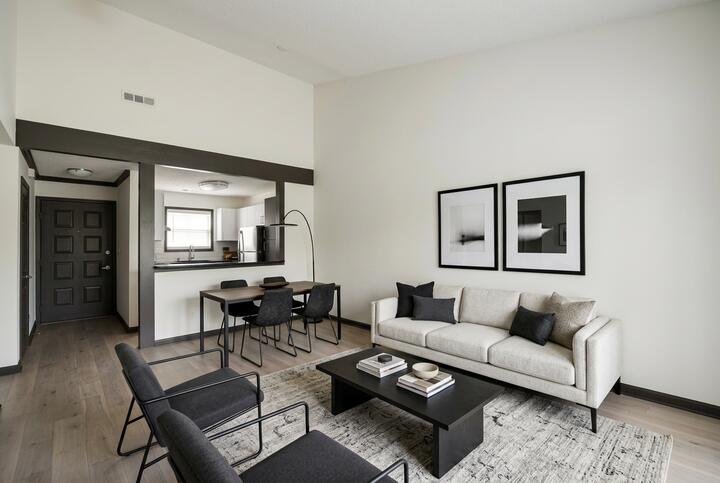
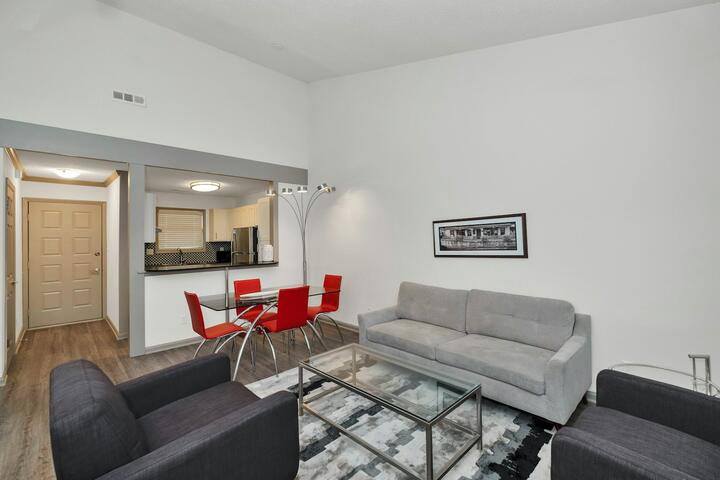 AI picture · Modern
Photo by Zac Gudakov on Unsplash
Photo by Lotus Design N Print on Unsplash
Photo by Lotus Design N Print on Unsplash
Real results from this tool, picked by us. Yours will differ.
Quick answer: upload a photo of your room, pick one of 8 styles and in about 30 seconds the AI draws the same room redesigned: new furniture, colours, textiles and decor. It tries to keep your walls, windows, doors and camera angle where they are (it did in 7 of 8 of our test pictures). Your first makeover is free, one per visitor; after that a makeover is 2 credits.
How to use AI Room Design
- Take the photo from a corner or a doorway, in daylight, so it shows the floor, two walls and the windows. A photo of your own room, or one you may use, with no people in it.
- Pick a style. Each tile shows the style’s three main colours; the picture follows the words under it.
- Tap what to keep if you want: the sofa, the bed, the floor, the wall colour and a few more stay as they are in your photo.
- Press Redesign, then slide across the picture to compare your photo with the AI picture, and download it if you like it.
What it keeps and what it changes
| It tries to keep | It changes |
|---|---|
| The walls, where they stand | The wall colour |
| Every window and door | The curtains and blinds |
| The ceiling and the floor plan | The floor colour and the rugs |
| The camera angle | The furniture, the lamps and the decor |
It is an AI picture of an idea for your room, not a plan, a quote or a promise: the furniture in it is drawn, not a product you can order, and its sizes are not measured. People, faces and anything readable (a letter, a name, a house number) are left out of the picture.
The 8 styles
| Style | What the AI is asked to draw |
|---|---|
| Modern | Clean lines, a neutral palette with black accents, low-profile furniture, clear surfaces |
| Japandi | Light oak, linen and wool, muted earth tones, low simple furniture, a few handmade ceramics |
| Scandinavian | White and pale grey walls, light wood, cosy wool textiles, simple useful furniture |
| Modern farmhouse | Warm whites, natural wood, black metal accents, board and batten, woven baskets |
| Boho | Layered rugs and textiles, rattan and cane, plants, terracotta and ochre accents |
| Coastal | Crisp white and soft blue, light woods, linen slipcovers, natural fibre rugs |
| Traditional | Classic furniture with turned legs, rich wood tones, patterned rugs, symmetry |
| Mid-century modern | Walnut, tapered legs, mustard and teal accents, sculptural lighting |
What it costs
Your first makeover is free, one per visitor, with no sign-up. We make a set number of free makeovers each day: on a day they are all used, yours waits until the next day. A free picture that does not come is not your free one, so you can try again. After that, each makeover uses 2 AI credits, and a picture that does not come gives its credits back.
| Credit pack | Makeovers | Each makeover |
|---|---|---|
| 10 credits for $2.99 | 5 | 60¢ |
| 30 credits for $6.99 | 15 | 47¢ |
| 100 credits for $17.99 | 50 | 36¢ |
Getting a better picture
- Show the room, not a corner of it. A wide photo with the floor and the windows in it gives the AI the room’s shape to keep.
- Daylight, lights on. A dark photo gives a dark, guessed picture.
- Try two styles. The same photo in Japandi and in Coastal shows quickly which way you lean.
- Then check the sizes. Like a sofa or a rug in the picture? Measure your room for it with the free rug size calculator, and try the layout to scale in the free 2D room planner.
Read next
- Kitchen makeovers before and after that skipped the full remodel
- Warm minimalist kitchen ideas: wood, white and way less stuff
- Olive green living room ideas that feel warm, not drab
- Light blue bedroom ideas that feel calm, not cold
AI room design questions
Is there a free AI room design tool?
Yes: your first makeover here is free, one per visitor, with no sign-up. After that a makeover is 2 credits, from 5 makeovers for $2.99. The free Rate My Room also rates a photo of your room and names three fixes.
How does AI room design work?
Your photo and the style you pick go to an AI image model, which draws the same room in that style. It is asked to keep the walls, windows, doors and camera angle and to change only the furniture, colours and decor. It did in 7 of 8 of our test pictures; when it does not, try another photo taken from further back.
Can AI interior design keep my walls and windows?
It tries to, and usually does: the picture is drawn from your photo, with the rule that every window, door and wall stays where it is. It can still move or add something now and then, so treat the picture as an idea, not a plan.
What is an AI room decorator?
A tool that redraws a photo of your room with new furniture and decor in a style you choose. This one has 8 styles, from Modern to Mid-century modern, and you can tap what to keep as it is, such as the sofa or the floor.
Can I design my room from a photo?
You can see a new style on your own photo here. To plan where the furniture goes to scale, use the free 2D room planner, which draws your room from its measurements.
How much does an AI room makeover cost?
The first one is free, one per visitor. Then 2 credits each: 5 makeovers for $2.99, 15 for $6.99 or 50 for $17.99. A picture that fails gives its credits back.
What happens to my photo?
It is made smaller in your browser and sent to our AI provider to make the picture. We keep neither your photo nor the picture: download the picture if you want to keep it. The full answer, including what our AI provider does with it, is in our privacy policy.