
Pick your siding color and see the shutter colors that stand out from it, measured by the light each color reflects, and the ones that blend in. Then paint the shutters on a sample house or on a photo of your own. Your photo never leaves your device.
Pick a color to paint the shutters
1Your house
2Your house and trim colors
3Shutters that stand out
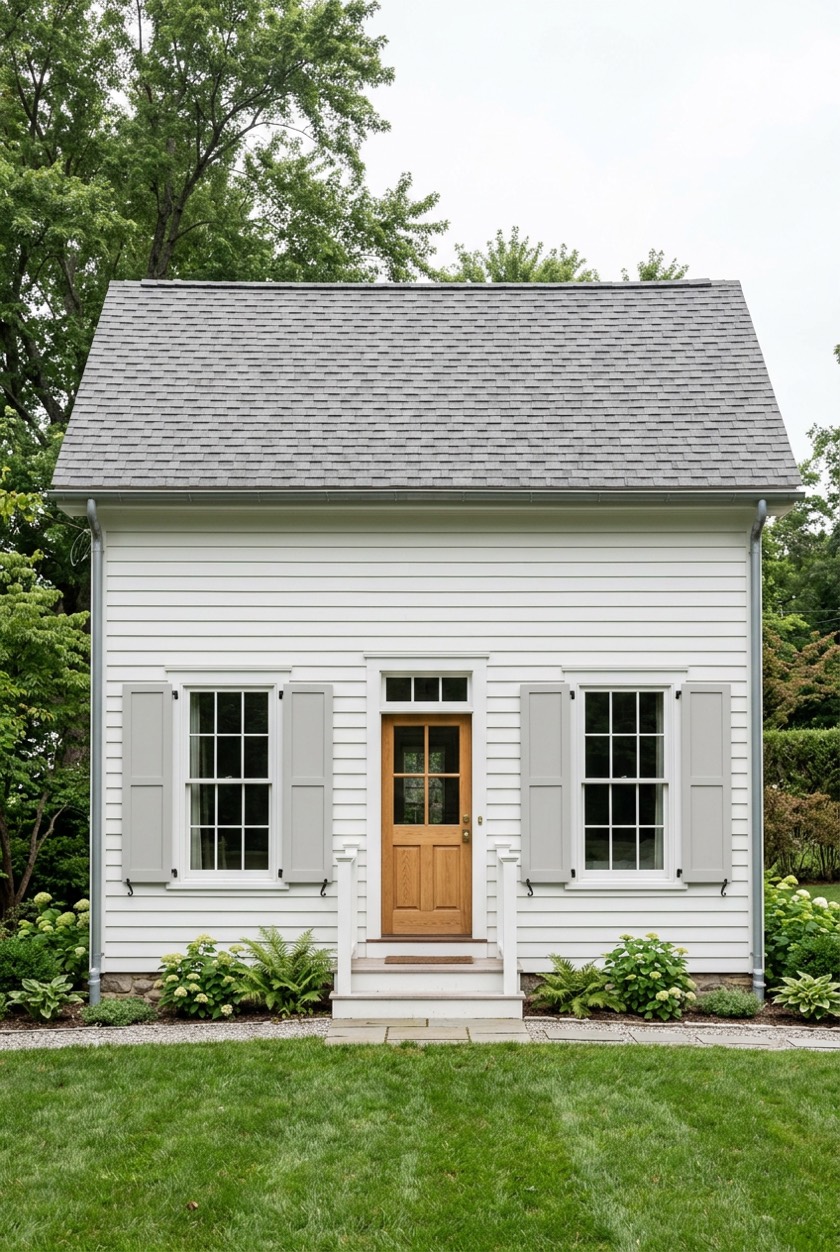
Soft Black shutters on a white house: an LRV gap of 86 with the siding (stands out in any light) and 92 with the trim (stands out in any light).
Gap = the difference in LRV (how much light a color reflects, 0 black to 100 white). Over 30 stands out in any light, 20 to 30 in daylight: the rule in the UK's Approved Document M.
4Or pick any shutter color
5Tap the shutters
On a sample house every shutter is painted for you. On your own photo, tap the middle of each shutter; a paneled or louvered shutter may need a tap on each panel. Paint on the window trim? Move Spread left, or wipe it with the eraser.
Quick answer: shutter colors that stand out are the ones whose LRV (light reflectance value) differs from your siding by more than 30 points. On white, cream, beige, greige, gray or sage siding that means dark shutters: black, navy, hunter green, cranberry or walnut. On red brick, black and dark red shutters only blend in, because brick is already dark; a light shutter such as dove gray, sage or white stands out. Pick your siding color above and the picker ranks every shutter color by that gap, then paints them on a house.
How to use the shutter color picker
- Pick your siding color. Tap the chip closest to your siding or brick, type its color code from a paint chip, or tap Read it off my photo and then tap the siding in your own photo.
- Say what the window trim is. Shutters sit right against the window trim, so the trim changes the second number on every idea. White is the default; cream, black or the same color as the house are the others.
- Read the ideas. Each shutter color family (black, navy and blue, green, red, gray, wood and white) shows its shade that stands out most clearly, with two gaps: against the siding, which is what you see from the street, and against the window trim.
- Tap an idea. On a sample house every shutter is repainted in it at once, with the photo’s own light and shade. On your own photo, tap the middle of each shutter; a paneled or louvered shutter may need a tap on each panel.
- Compare and save. Compare puts a before and after slider across the photo, and Save image keeps the result to send to whoever is choosing with you.
The rule: an LRV gap of more than 30 points
LRV is how much light a color reflects, from 0 for black to 100 for a perfect white. Paint makers print it on most color cards. The picker works it out from each color’s on-screen value, so it is close to the printed figure but not a measurement of a real chip.
How far apart two LRVs must be before one surface stands out against another is set out in the UK’s building guidance for accessible buildings. Approved Document M, Volume 2, paragraph 0.26 defines “contrast visually” like this:
“the difference in light reflectance value between the two surfaces is greater than 30 points. Where illuminance on surfaces is greater than 200 lux, a difference in light reflectance value should be a minimum of 20 points.”
That guidance was written so people with low vision can find a door in a public building. It is not a rule for houses, but it is a clear, measured answer to “will my shutters stand out”, so the picker uses it as a yardstick (it is the same rule as the free front door color picker). Daylight is far brighter than 200 lux, so:
- Over 30 points: stands out in any light. The shutters frame the windows from across the street, morning or dusk.
- 20 to 30 points: stands out in daylight. In full sun they read; in shade or at dusk they fade into the wall.
- Under 20 points: blends in. That can be the look you want: tone-on-tone shutters that add texture without drawing the eye.
What Benjamin Moore says about shutters
Benjamin Moore counts shutters among the colors of a house, not as an afterthought: Most homeowners use three to four colors in their exterior design, considering elements like trim, windows, garage doors, and shutters. Additionally, hues from existing materials—such as brick, stone, or roofing—enhance and complete your exterior color palette.
So pick the shutter color with the roof and any Brick or Stone in view, not from a chip alone.
For the finish, its exterior sheen guide lists shutters under two sheens: Satin (Siding, Trim, Shutters, Doors
) and Semi-Gloss/Soft Gloss (Trim, Shutters, Doors, Architectural Details
). Most painters match the shutters’ sheen to the trim’s.
Shutter colors by siding color
With white window trim, these are the shutter colors from the picker’s board that stand out from each siding color in any light, with their LRV gap from the siding, and the ones that blend in.
| Siding | LRV | Shutters that stand out (gap) | Blend in |
|---|---|---|---|
| White #F4F1EA | 88 | Soft Black (86), Navy (84), Hunter (83) | none |
| Cream #F3EAD3 | 83 | Soft Black (81), Navy (79), Hunter (78) | none |
| Beige #DCC7A6 | 59 | Soft Black (57), Navy (55), Hunter (54) | none |
| Greige #D6CFC4 | 63 | Soft Black (61), Navy (59), Hunter (58) | none |
| Light gray #C9CAC6 | 59 | Soft Black (57), Navy (55), Hunter (54) | none |
| Gray #A3A5A1 | 37 | Soft Black (35), Navy (33), Hunter (32) | none |
| Sage #A9B59B | 44 | Soft Black (42), Navy (40), Hunter (39) | none |
| Blue-gray #7D8C96 | 25 | Dove Gray (34), Bright White (69) | none |
| Red brick #9B4A3A | 12 | Dove Gray (47), Sage (32), Bright White (82) | Jet Black, Oxblood |
| Charcoal #45484A | 6 | Sage (38), Coastal Blue (32), Pewter (31) | Jet Black, Barn Red |
| Navy #2B3A55 | 4 | Sage (40), Coastal Blue (34), Pewter (33) | Barn Red, Jet Black |
Color names here are the picker’s own, not a paint brand’s. To try a brand’s color, type its code into the color box, or get the code from a photo with the paint color matcher.
Three worked examples
A white cottage. The white sample’s siding is close to White (LRV 88). Black shutters (Soft Black, LRV 2) are 86 points from it: the strongest contrast on the board, which is why black shutters on a white house are a classic. The sample opens with its shutters painted Soft Black.
A red brick ranch. Red brick is dark (LRV about 12). Jet Black shutters are only 11 points from it and Hunter green only 7, so on brick they blend in: a quiet, traditional look rather than a contrast. If you want the shutters to show from the street, a light shutter does it: dove gray stands 47 points from the brick, sage 32. The sample opens with Hunter shutters; tap Dove Gray to see the difference.
A gray house with white trim. On Gray siding (LRV 37), black, navy and hunter green all clear 30 points. White shutters stand out from the siding too (57 points) but are 0 points from white trim, so they merge with the window frames; the picker ranks them lower for that reason.
Common mistakes when choosing shutter colors
- Black shutters on dark brick, expecting contrast. They suit brick, but by LRV they blend. Decide whether you want the shutters to frame the windows or to recede.
- White shutters on white trim. With no gap from the trim, the shutters and the window frame read as one wide white block.
- Ignoring the roof and the brick. As Benjamin Moore says, the materials you are not painting are part of the palette. Look at a sample against them.
- Judging a chip in your hand. A chip at arm’s length looks darker and stronger than a shutter seen from the street. Paint a sample board and stand at the curb.
- Too many accent colors. Shutters and the front door are both accents. Many houses use one accent color for both; the front door color picker runs the same gaps for the door.
Repainting the whole house? The exterior house color visualizer paints the siding on your photo, and the free 2D room planner plans the rooms inside.
Paint the whole houseRead next
- Exterior color schemes for red brick houses
- Curb appeal ideas
- Cape Cod house exteriors
- Exterior ideas for brown brick homes
- Green house exterior ideas
- Window box ideas
Shutter color questions
What color shutters go with a white house?
Almost any dark shutter stands out on white siding: black, navy, hunter green, cranberry or walnut are all more than 80 LRV points from white. Black gives the strongest contrast. White shutters on a white house blend in.
What color shutters go with red brick?
For contrast, a light shutter: dove gray, sage or white stand out from red brick. Black, dark green and dark red shutters are the traditional choices on brick, but they are close to the brick in LRV, so they give a quiet, tone-on-tone look instead of a contrast.
Do black shutters look good on a brick house?
They are a classic on brick, but they do not stand out from it: red brick is already dark, so black shutters are only about 11 LRV points from it. They suit a brick house when you want the windows framed quietly; white trim around the windows is what makes them read.
What color shutters go with a gray house?
Black, navy, hunter green and cranberry all stand out from mid-gray siding. On light gray siding, walnut and slate stand out too. White shutters stand out from gray siding but merge with white trim.
What color shutters go with a beige house?
Dark shutters: black, navy or hunter green are all more than 50 LRV points from a beige like the picker’s. A wood tone such as walnut stands out too and keeps the warm look.
Should shutters match the front door?
They can. Shutters and the front door are both accents, and using one accent color for both is common. If the door is a bold color, a quieter shutter keeps them from competing. The front door color picker runs the same LRV gaps for the door.
What sheen should shutter paint be?
Satin or semi-gloss. Benjamin Moore’s exterior sheen guide lists shutters under both. Most painters use the same sheen as the trim.
Can I try shutter colors on my own house?
Yes. Upload a photo of your house, tap an idea or pick any color, then tap each shutter. Your photo never leaves your device: the painting happens in your browser.